
In the current digital world, a Discord server is more than just a chat room; it is a visual extension of a community’s identity. 🎮.
If you are building a professional networking hub or a niche fan base, branding is what separates a “default” server from a curated experience. 🪐☁️
One of the most effective, lightweight, and high-impact ways to establish this branding is through the strategic use of aesthetic symbols, Unicode characters, and custom text dividers. 𓍢ִ໋🌷͙֒ .
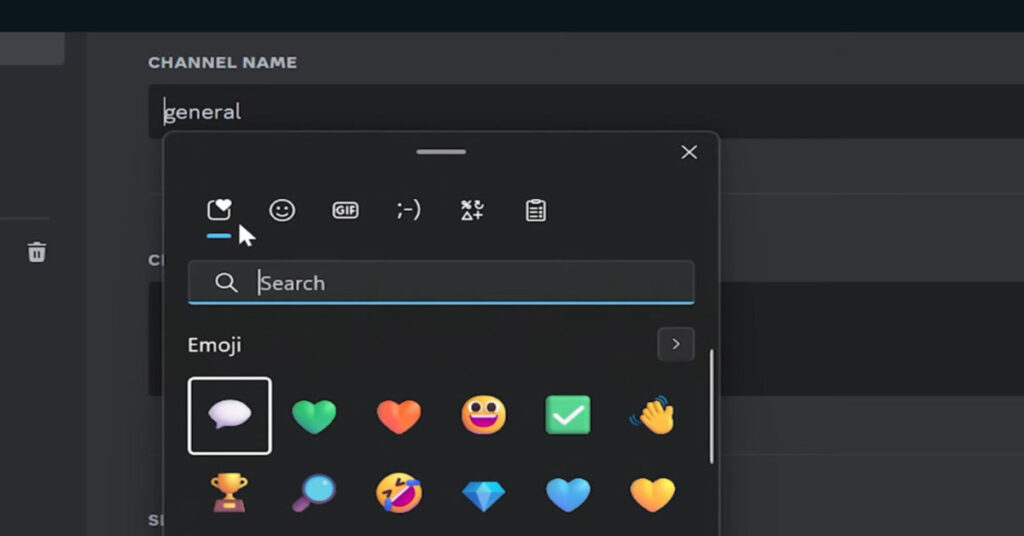
Because Discord’s UI relies heavily on text-based navigation, these symbols act as the “graphic design” of your server architecture. 🛠️🎨
The Psychology of Visual Hierarchy in Discord 🧠✨
Before we tell “how,” it is essential to understand the “why.” When a new member joins your server, their eyes naturally scan the sidebar. A wall of plain text is difficult to navigate and can feel overwhelming. 📋😵💫
By using related symbols & icons that represent the meaning of the channel, you create a visual hierarchy. 📂📍 This reduces cognitive load, allowing users to find the “rules” or “announcements” sections instantly & easily.
You are providing “visual anchors” that categorize your content before a single sentence is read. (づ ᴗ _ᴗ)づ♡
Phase 1: Auditing Your Server’s “Core Aesthetic” 🕯️📜
Branding starts with a vibe. You shouldn’t just grab every sparkle or star symbol you find instead choose a specific icon that aligns with your community.
You can find best collections on Aesthetic Combos to match these popular styles:
- Coquette & Soft-core: 🎀🩰 Focus on bow emojis and delicate floral elements. This style is perfect for community driven or “soft” aesthetic servers. 𖦹 🌷 🫧
- Y2K & Cyber: 👾⚡ Use sparkle symbols, pixel-inspired icons, and high-contrast characters. This suits gaming communities or tech-focused hangouts. ✮ ⋆ ˚。𖦹 ⋆。°✩
- Minimalist & Tech: ⌨️🖤 Use clean, geometric shapes and star symbols to maintain a professional look. ⬡ ✦ ◼︎
- Gothic & Dark Academia: ⚰️📜 Use cross symbols and heavy borders to create a moody, studious atmosphere. ⸸ 🕸️ ✥
Phase 2: Optimizing Channel Names with Aesthetic Symbols 📂🏷️
The channel list is your primary branding. To make them pop, you can use pre-made beautiful combos to ensure your layout looks professional. (˶ᵔ ᵕ ᵔ˶)
1. The Prefix Method 📍
Place a consistent symbol at the beginning of every channel. This creates a “bullet point” effect that looks organized.
Example:
╰┈➤ 📁 · information
╰┈➤ 💬 · general-chat
2. The Symmetry Method ⚖️
Wrap your text in symbols to create a “contained” look. This is excellent for category headers.
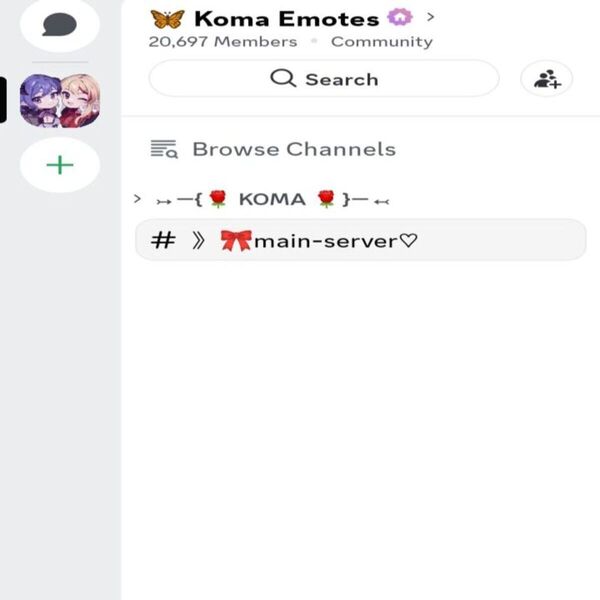
You can find inspiration in the decorative symbols or bracket symbols for unique wrapping characters. 𓊆 ✧ 𓊇
3. Handling Unicode Compatibility 📱✅
A common mistake is using “fancy fonts” that appear as empty boxes for some users.
To ensure your server is accessible to everyone, use our reliable font generator tool that prioritizes high-compatibility characters. 🔠✔️
Phase 3: Using Dividers to Create “Rooms” ╌╌╌ ✨
In a physical building, you have walls and hallways. In Discord, you have dividers.
These are long strings of symbols that visually separate different sections of your server. 🧱🎐
Using dividers helps group related channels together, making the server feel like a unified ecosystem.
Our divider symbols collection offers various styles, from simple lines to adorable floral patterns. 𓆸 𓆸 𓆸
Popular Divider Styles:
- The Dotted Line: ╌╌╌╌╌╌╌╌ (Clean and professional) ☁️
- The Heart String: ˗ˏˋ ♡ ˎˊ˗ (Perfect for “Rules” or “About” sections) 🧸
- The Creative Border: Use animals like cat kaomojis, dog emojis, & bunny symbols at the ends of your dividers to add personality to a pet-friendly or “kawaii” server. ฅ^•ﻌ•^ฅ
Phase 4: Enhancing the “About Me” and Rules Sections 📝✨
Your “Welcome” or “Rules” channel is where you can truly go maximalist. This is the place for dot art and complex layouts. 🖼️👾
If you are a server owner or moderator, you can use an aesthetic bio generator to create an awesome “About the Owner” section in your introduction channel.
This adds a layer of personability to the leadership team. ʚ🍓ɞ
Phase 5: Technical Performance & Clutter Control ⚙️🔋
From a technical point of view, symbols are much better for your server “performance” than uploading custom images for every header.
- Low Latency: ⚡ Text symbols load instantly, whereas heavy images or GIFs can take time on mobile devices.
- Searchability: 🔍 While you shouldn’t over-clutter names, a single well-placed symbol won’t stop members from finding your channels.
Avoiding “Clutter Fatigue” ⚠️🛑
Use relevant symbols that add value.
- Consistency is King: If your “General” chat has a star, all your “Social” category channels should probably have a related celestial symbol. 🌙⭐
Conclusion: Your Server, Your Canvas 🎨🖌️
Branding your Discord server with aesthetic symbols is a free & high-reward strategy.
It transforms a standard communication tool into a beautiful digital environment. By focusing on aesthetic symbols and visual hierarchy.
you create a space that users don’t just use, they enjoy “being” in. ˚🎧⊹♡
Ready to start decorating? Explore the full library of emojis, symbols, emoticons and kaomojis organized by themes to find the perfect match for your community’s vibe. ( ´ ▽ ` )ノ
Frequently Asked Questions
Will using aesthetic symbols in channel names affect Discord search?
As long as you don’t overdo it, If you place a symbol before or after the text (e.g., ✧-general), Discord’s “Quick Switcher” (Ctrl+K) will still find the channel easily.
Avoid replacing letters with symbols (like using gℯnℯrαl) if you want to keep search functionality perfect.
Can I use aesthetic fonts for my Discord channel names?
Discord converts all channel names to lowercase and replaces spaces with hyphens. While you can’t use “fancy cursive” fonts for the channel names themselves, you can use bold or small-caps Unicode fonts to make them stand out.
Can I use kaomojis in my Discord server rules?
Absolutely, Kaomojis are excellent for making your rules feel friendly and welcoming rather than strict.
Using (ᵔᵕᵔ) or (˶ᵔ ᵕ ᵔ˶) can make your community feel more approachable.
How many symbols should I use per channel name?
We recommend the “One or Two” rule. One symbol at the start or one on each side is perfect. Too many symbols create “visual noise,” which makes the server harder to navigate.
Do I need Discord Nitro to use these symbols and combos?
No, All the emojis, symbols, kaomojis and decorative dividers on Aesthetic Combos are standard Unicode characters. They are 100% free to use for everyone, with or without Nitro.